The Practical Soldering Guide: From Cold Iron to Clean Joints
Nobody learns to solder by reading about it. You learn by burning your finger once, making a few terrible joints that look like grey chewing gum, and then gradually figuring out why. This guide is here to compress that curve, so you spend less time fixing mistakes and more time actually building things.
The same handful of principles makes or breaks every joint, whether you're attaching a resistor or a 64-pin chip. Quick prototypes on perfboard, production PCBs with fine-pitch ICs, it doesn't matter.
What You Need Before You Start
You don't need expensive gear to solder well. But the absolute minimum matters.
The iron. Get a temperature-controlled station, not a cheap fixed-wattage iron from a hardware store. You don't need to spend much, but temperature control changes everything. Without it, you're guessing. A good beginner station runs around $40–60 and will last years.
Solder. For through-hole work on Arduino and hobby circuits, standard 60/40 rosin-core solder in 0.8mm diameter is the right choice. The "rosin core" part means there's flux built into the center of the wire, which is what makes solder actually flow and bond to metal.
Tip cleaner. A small pot of brass wool (the coiled, curly kind that looks like steel wool but is golden). More on why in a moment.
Desoldering braid. This is a flat, braided copper ribbon. When you press it against a joint and apply heat, it wicks solder up out of the joint by capillary action. You'll use this more than you expect.
A multimeter. Not optional. After soldering, you'll use it to check that your joints actually conduct (continuity test) and that you haven't accidentally bridged power to ground (short circuit check). More on this later.
Temperature: The Setting Nobody Talks About Enough
Most beginners set the iron too hot because they've heard "more heat = faster work." That's wrong.
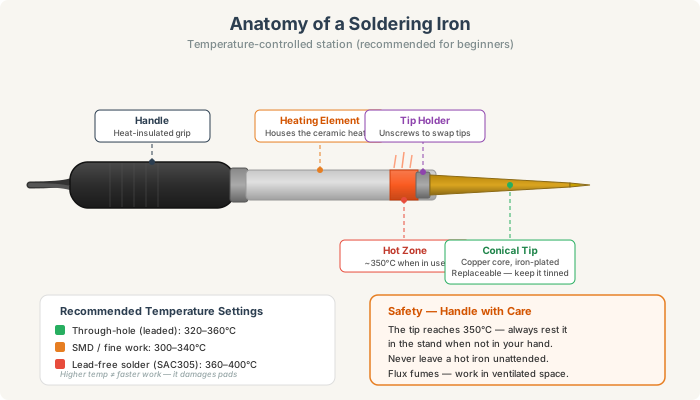
For 60/40 leaded solder through-hole components (the kind you're most likely doing), 320–360°C is the range. 340°C is a good starting point for general work. Lead-free solder (SAC305) needs more heat: 360–400°C. SMD work on fine components usually calls for 300–340°C to reduce the risk of lifting pads.
The goal is to make a clean joint in 2–3 seconds. If you're pressing the iron down for 10 seconds and the solder is still lumpy and grey, the issue isn't more heat. It's a dirty tip, or not enough flux, or both. Cranking up the temperature will just burn the flux away faster and make things worse.
The Tip Is Everything: Keep It Tinned
This is the part that no beginner gets told clearly enough: the condition of your tip is more important than your iron's wattage or temperature.
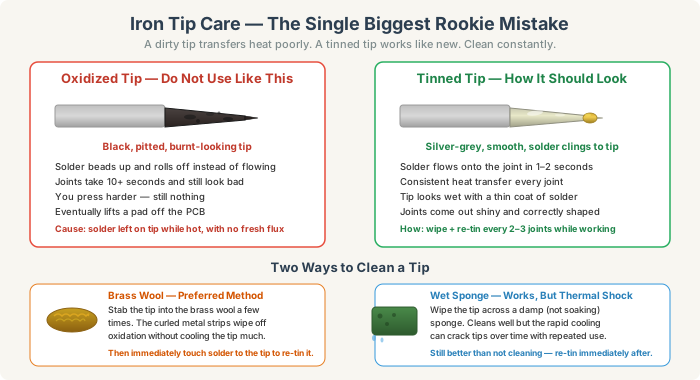
A dirty, oxidized tip (dark black, crusty, with solder beading off it) transfers heat poorly. You can press it against a joint for 15 seconds and barely anything happens. Then you push harder. Then you lift a pad off the board.
A properly tinned tip (silver-grey, smooth, with a thin coat of fresh solder clinging to it) transfers heat the moment it touches the joint. Solder flows in 1–2 seconds. You're in and out before anything gets damaged.
How to keep your tip in good shape:
After every 2–3 joints, stab the tip into your brass wool a few times and then immediately touch a bit of fresh solder to the cleaned tip. That's it. The brass wool wipes off the oxidized solder without cooling the tip much, and the fresh solder protects the bare metal from oxidizing again.
If you're using a wet sponge instead, it works fine, but the rapid temperature change from room-temperature water to 350°C eventually causes small cracks in the tip plating over time. Brass wool is gentler.
Before you put the iron away at the end of a session, apply a generous blob of solder to the tip. This "tinning" coat protects it while it's cool. The first thing you do when you turn it on next time: wipe the tip, apply fresh solder, and you're ready.
Making the Joint
Here's the sequence that produces a good joint every single time.
First, make sure the surfaces are clean. Fresh solder on a dirty, oxidized wire or pad won't stick. If you're working with wire that's been sitting in a parts bin, the ends are probably oxidized. Strip fresh copper, apply a tiny bit of flux, and you're good.
Heat the joint, not the solder. Touch the iron to the spot where the component lead meets the copper pad simultaneously. Hold it there for 1–2 seconds to bring both up to temperature. This is the step most beginners skip. They touch solder to the iron tip and watch it melt onto the board like a drip. That's not a joint, that's a cold blob.
Then bring solder to the joint. Once the pad and lead are hot, touch the solder wire to the junction of pad and lead, not to the iron. The solder should flow immediately and spread out around the lead and across the pad.
Pull the solder away first, then the iron. Remove the solder wire, then lift the iron cleanly off. Don't drag it sideways.
Don't move anything while it cools. Hold still for 3–5 seconds. If the joint gets disturbed before the solder solidifies, you get a cold joint. The surface looks rough and crystalline instead of smooth and shiny.
Clip the lead. After the joint is fully cool, snip the excess component lead flush with the board. Cut it after soldering, not before. Clipping first can displace the component while you're trying to solder.
Reading Your Joints
Once a joint is done, you can tell how well it went just by looking at it. This gets faster with practice, but here's what to look for:
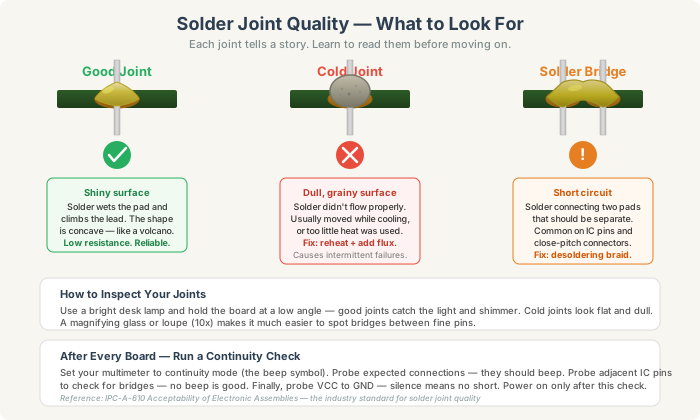
A good joint is shiny and smooth with a concave profile, like a tiny volcano. The solder clings to both the lead and the pad, and the lead is visible poking through the center. The surface catches the light.
A cold joint is dull and grainy, sometimes lumpy. It might look like it's sitting on the pad rather than bonded to it. This joint might work intermittently or fail entirely under vibration. The fix is straightforward: touch the iron to the joint to reflow it, add a tiny bit of fresh solder (or a drop of liquid flux), hold still while it cools, done.
A solder bridge is when solder connects two pads that should be separate. This is a short circuit. It's especially common when working on IC pins that are close together. The fix is desoldering braid: cut a short piece, lay it over the bridge, press the iron on top of the braid, and the excess solder wicks up into it. Remove the braid and iron together.
Before You Power Anything On
Skipping this step has destroyed more projects than anything else.
Set your multimeter to continuity mode (the setting that beeps when there's a connection). Go through and probe the connections you soldered. Expected connections should beep. Then probe adjacent pins on any IC or connector to check for bridges. No beep there is exactly what you want.
Finally, probe your power rail (VCC) to ground. Silence. If you get a beep or a near-zero reading on your meter, there's a short somewhere and you need to find it before you plug anything in.
Once you've done this a few times, it takes under two minutes. It has saved countless boards.
The Tools You'll Reach For Again and Again
Desoldering braid is the one you'll be most grateful you bought. Bridges, badly-placed components, joints that need redoing, braid handles all of it. The technique is simple: lay it over the solder you want to remove, press the iron on top, wait for the solder to wick up into the braid, pull braid and iron away together. Don't let the braid sit on the pad once the solder is absorbed or you'll lift the pad.
Liquid flux in a pen is worth having for rework. When you're re-soldering a joint that's been heated a few times, the flux in the original solder is gone. A drop of fresh flux from a pen makes the joint flow cleanly again.
IPA (isopropyl alcohol, 90% or higher) and an old toothbrush are all you need to clean flux residue off a finished board. No-clean flux can be left as-is. Rosin flux should be cleaned because it's mildly acidic when wet and can cause corrosion over months.
Common Mistakes and What's Actually Happening
Solder beads up and rolls off the pad. The pad is dirty or oxidized, or the tip is dirty, or there's not enough heat getting into the joint. Check all three before you try again.
Joints look dull or grey. Either a cold joint (moved too early, or not enough heat to flow properly), or the solder is lead-free and you're not running hot enough.
Component keeps shifting position while you solder. Use a "tack" approach: before soldering all the pins, put one drop of solder on one corner pin to hold the component in place. Adjust position if needed while that joint is still liquid. Then solder the rest.
Solder won't flow onto wire leads. Old wire with heavy oxidation. Strip fresh copper, twist the strands tightly, then tin the end of the wire before soldering it to a pad or terminal.
Pad lifts off the board. Too much heat for too long. This usually means the tip was dirty (requiring more time and pressure), or you were at too high a temperature. The pad is held by a thin layer of adhesive and will detach if it absorbs too much heat. If it lifts, you can sometimes still make the joint work (the trace is usually still intact), but the mechanical strength is gone.
A Note on Fumes
Solder flux fumes are not great to breathe. They won't send you to hospital for an afternoon of hobbyist work, but regular exposure adds up. A small USB fume extractor (basically a fan with an activated-carbon filter) costs very little and makes a real difference. Point it so the fumes go toward the fan, not toward your face. If you don't have one, a small desk fan blowing away from you across the work area is better than nothing.
The only way to get better at soldering is to solder. Your first few joints will look rough. Your joints after a full board will look noticeably better. Your joints after a few projects will be something you're actually proud of. The iron, the solder, and the technique don't change. Your hands just get used to the timing.
Start with large through-hole components on a spare piece of perfboard or a practice PCB. They're forgiving and fast to do. Once you're getting consistent joints on those, everything else gets easier.